
How to Set Auto Reply in Outlook (Out of Office Guide 2026)
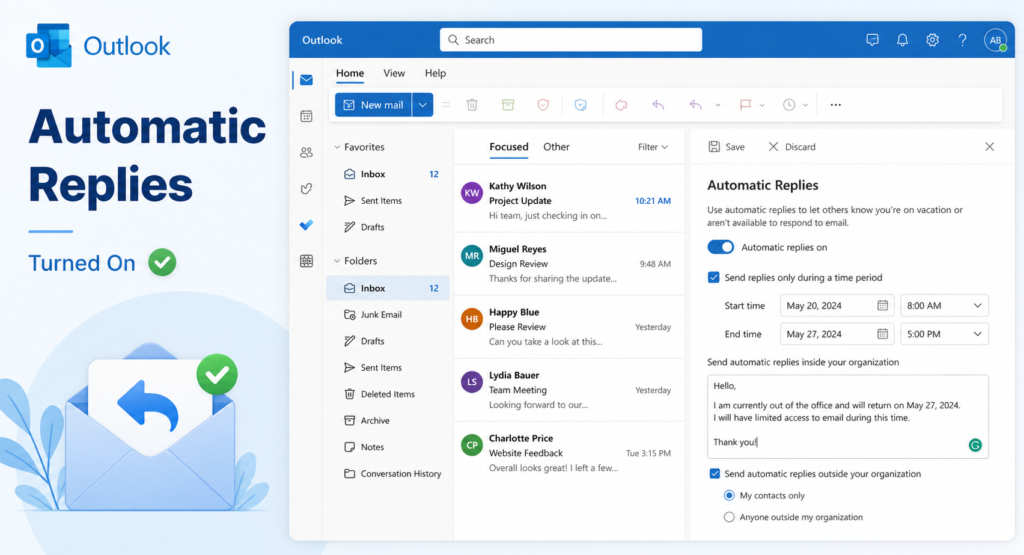
How to Set Auto Reply in Outlook (Complete Guide) Auto reply in Outlook, also known as “Out of Office,” is a useful feature that automatically responds to emails when you are unavailable. It helps maintain professional communication while you are on vacation, sick leave, or away from work. In Microsoft Outlook, auto reply ensures that […]
How to Change Default Font in Outlook (Step-by-Step Guide)
How to Change Default Font in Outlook (Complete Guide) Changing the default font in your email can improve readability and give your messages a more professional look. Whether you prefer a clean modern font or a specific style for branding, Outlook allows you to customize your default font settings easily. This guide explains how to […]
Dallas ISD Outlook Login Guide (Access, Setup, and Fixes)
Dallas ISD Outlook: Login, Access, and Troubleshooting Guide Dallas ISD Outlook is the official email system used by students, teachers, and staff of Dallas Independent School District. It is powered by Microsoft Outlook and provides secure communication, calendar access, and collaboration tools. This guide explains how to log in, set up your account, and fix […]
Can You Unsend an Email in Outlook? Recall, Delay & Fix Guide
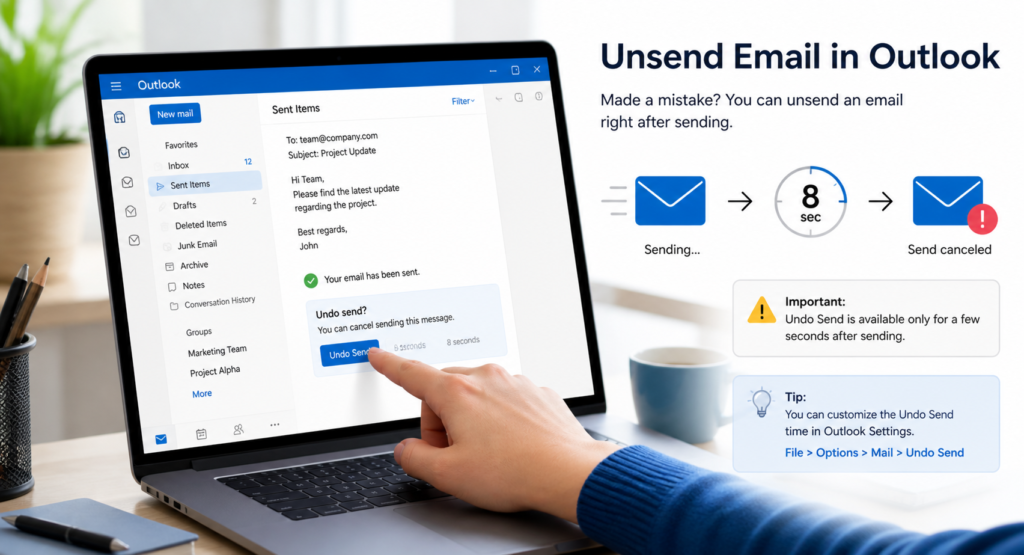
Can You Unsend an Email in Outlook? Complete Guide Sending an email too quickly is a common mistake. Whether it’s a missing attachment, a typo, or the wrong recipient, many users wonder if they can unsend an email in Outlook. The answer depends on the feature you use and the conditions involved. Microsoft Outlook offers […]
Unsend Email in Outlook (How to Recall or Undo Sent Emails)
Unsend Email Outlook: Complete Guide to Undo Sending Emails (2026) Introduction Sending an email by mistake can be stressful, especially when it contains errors or was sent to the wrong person. Many users search for ways to unsend email Outlook messages after hitting send too quickly. The truth is, Outlook does not always allow a […]
How to Recall a Message in Outlook (Easy Step-by-Step Guide)
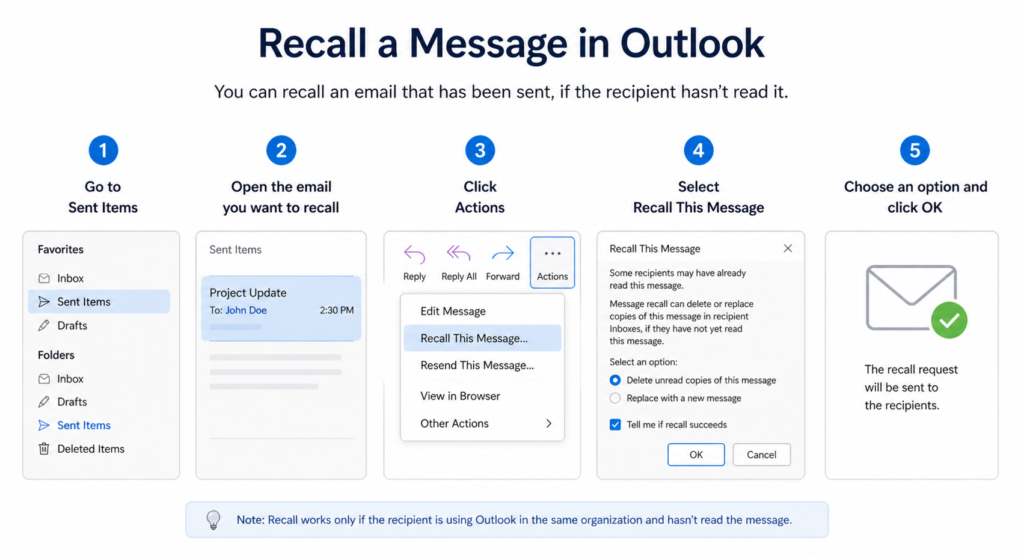
How to Recall a Message in Outlook: Step-by-Step Guide (2026) Introduction We’ve all experienced that moment of panic after sending an email too quickly. Maybe you noticed a mistake, forgot an attachment, or sent it to the wrong person. In such cases, knowing how to recall a message in Outlook can help you fix the […]
How to Encrypt Email in Outlook (Easy Step-by-Step Guide)
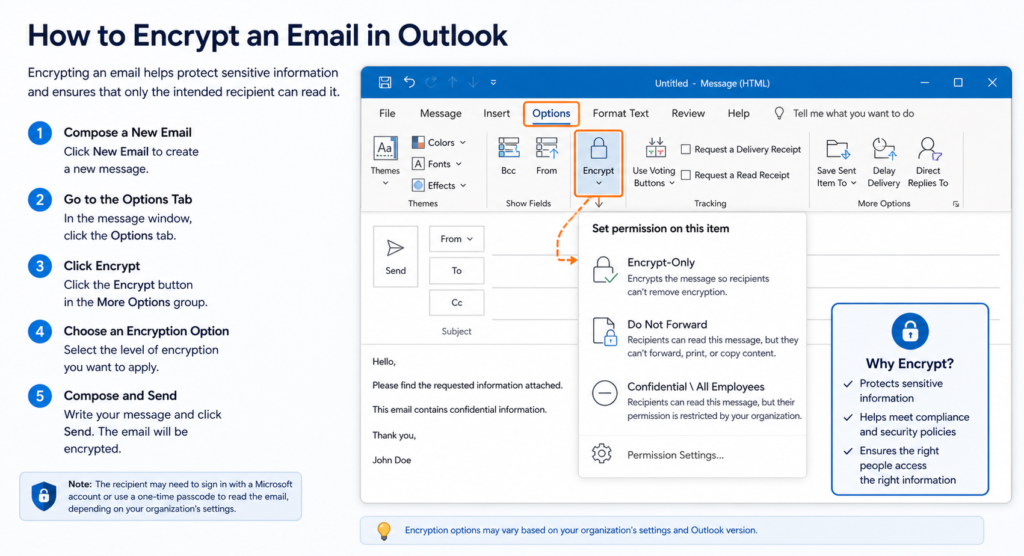
How to Encrypt Email in Outlook: Step-by-Step Security Guide (2026) Introduction Email security is more important than ever. Sensitive information like business data, passwords, or personal details can be exposed if not protected properly. That’s why learning how to encrypt email in Outlook is essential. Email encryption ensures that only the intended recipient can read […]
Duke Outlook Guide (Login, Features & Fixes Explained)

Duke Outlook: Complete Guide to Email, Login, Features, and Troubleshooting (2026) Introduction Duke Outlook is the official email and communication platform used by Duke University for students, faculty, and staff. It is powered by Microsoft Outlook and integrated into the Microsoft 365 ecosystem, making it a secure and reliable system for academic and administrative communication. […]
How to Set Out of Office in Outlook (Easy Auto Reply Guide)
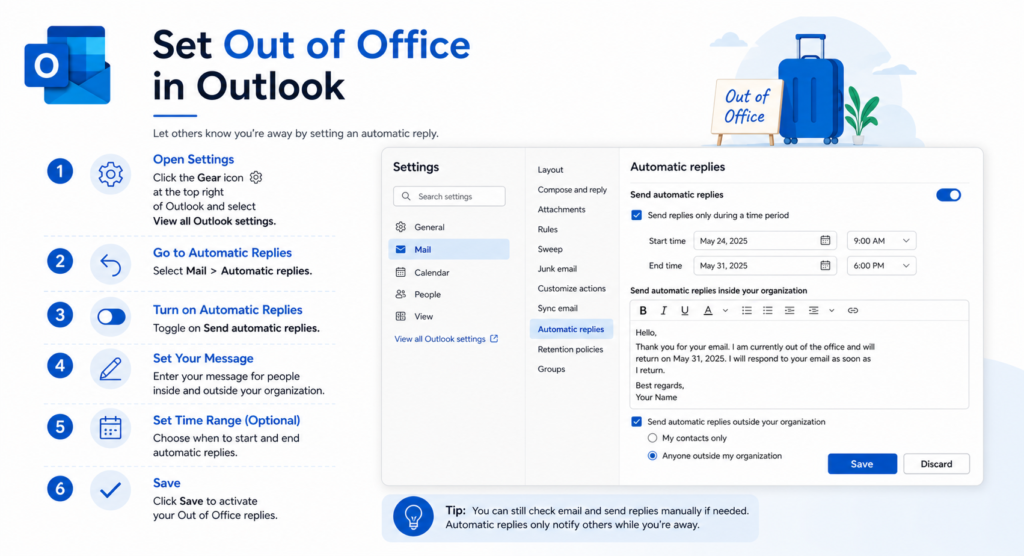
How to Set Out of Office in Outlook (Step-by-Step Guide 2026) Introduction When you’re on vacation, sick leave, or simply away from work, it’s important to let people know you’re unavailable. That’s where the Out of Office feature helps. Learning how to set out of office in Outlook allows you to send automatic replies to […]
How to Retract an Email in Outlook ( Guide to Recall Messages)
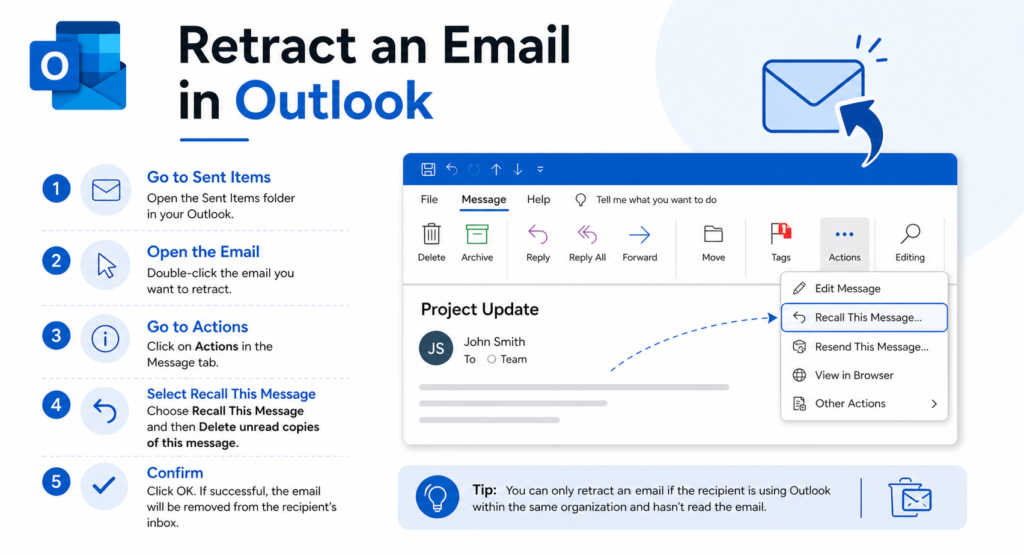
How to Retract an Email in Outlook (Step-by-Step Guide 2026) Introduction Sending an email by mistake happens to everyone. Maybe you forgot an attachment, noticed a typo, or sent it to the wrong person. In such cases, learning how to retract an email in Outlook can save you from awkward situations. Outlook offers a recall […]