
Have you ever wondered why some freelancers grow big and open their own agency while others stay small and keep struggling forever? This is a question that haunts many people in the digital marketing world. You work hard. You have skills. You deliver good work to your clients. But still, you feel stuck. You feel like you are running on a treadmill – moving but not going anywhere.
The answer to this question is not about working harder. It is not about having better skills than others. The real answer is just one word: System.
Think about two freelancers for a moment. Both are good at their work. Both know SEO, guest posting, and outreach. But one of them works without any plan. He wakes up every morning and thinks, “What should I do today?” He opens his email. He checks Facebook. He does whatever work comes his way. Some days he is busy. Some days he is free. He has no system. His work is random.
The second freelancer works with a clear plan. He knows exactly what he needs to do first thing in the morning. He knows what his second task will be. He knows what his last task will be before he closes his laptop. He has a step-by-step process for everything. This process is called an SOP or Standard Operating Process. This is what helps him grow from a freelancer to an agency owner.
The exact same thing happens with cold email outreach. Cold email is one of the most powerful ways to get new clients. But most people do it wrong. They find some emails randomly. They send some messages without any plan. They get no replies. Then they say, “Cold email does not work anymore. It is dead.”
But the truth is very different. Cold email is not dead. It works better than ever. The problem is not the cold email. The problem is that their system does not work. They have no process. They are doing things randomly. And random work never gives consistent results.
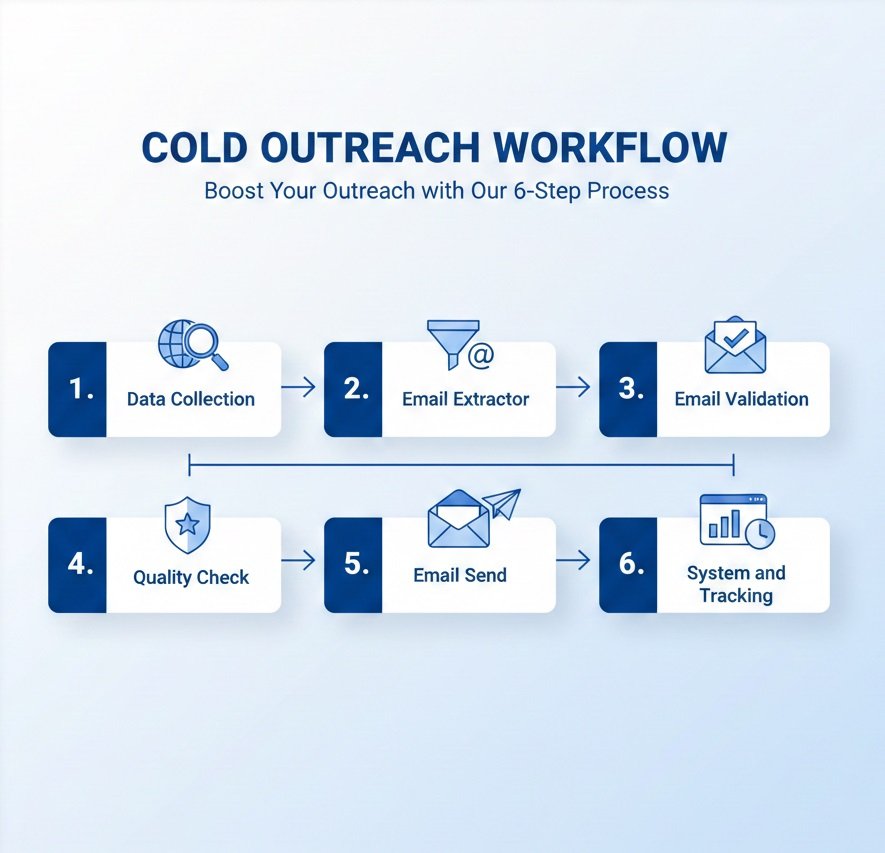
Today, I am going to share with you the complete 6-Step Agency Level Cold Outreach System from TimeSolutionZ. This is not some theory I read on the internet. This is the exact same system we use every day for our clients. This is the system that helped us become Upwork Top Rated. This is the system that has helped us complete hundreds of successful projects. This system can become the backbone of your agency too if you follow it properly.
I want you to save this guide. Read it carefully. Maybe read it two or three times. Then start using it today. Do not wait for Monday. Do not wait for next month. Start today. Because every day you wait, you are losing clients to someone who already has a system.
Step 1: Data Collection Using Monster Data Machine
The very first step in any cold outreach system is data collection. This might sound simple, but it is actually the most important step. Think about it this way. If you are trying to sell guest posting services, you need to find websites that actually buy guest posts. If you are trying to sell SEO services, you need to find websites that need SEO help. If you send your emails to the wrong people, no one will reply. It does not matter how good your email is. It does not matter how good your offer is. If you are talking to the wrong person, your email is wasted.
This is why we use Monster Data Machine for this step. This tool is specially made for people who do guest posting, link building, and SEO work. It helps you find the right websites quickly without wasting hours of your time.
When you are collecting data, you need to be very careful about the filters you use. You cannot just take any website that comes your way. You need to be selective. You need to think like an agency owner, not like a freelancer.
Here are the filters you should always use:
- Country: Only take websites from countries where you want to work. The best countries are USA, UK, Canada, and Australia. These countries have clients who pay well and understand the value of good work.
- Niche: If you sell guest posts in the health niche, only take websites that are about health. If you take websites about technology, your email will not make sense to them. Stay in your niche.
- Traffic: Only take websites that get more than 1000 visitors every month. This is very important because it shows the website is alive. It shows real people visit that website. Dead websites with no traffic are useless for your clients.
- DR (Domain Rating): Take websites with DR 30 or more. DR stands for Domain Rating. It is a score that shows how powerful a website is. Higher DR means more value for your clients.
There is one very important rule you must never break. Never take websites from gambling, casino, or adult sites. These are bad neighborhoods on the internet. If you send emails from these sites, your email reputation will get hurt. Google will start marking your emails as spam. So stay away from these niches completely.
After you apply all these filters, Monster Data Machine will give you a clean list of websites. We call this your “Raw List”. This list is the foundation of your entire outreach campaign. If your foundation is strong, your campaign will be strong. If your foundation is weak, your campaign will fail. So take your time with this step. Do not rush.
Step 2: Email Extraction Using Monster Email Extractor
Now you have a list of websites. The next step is to find email addresses from these websites. But here is the thing. Just finding any email address is not enough. You need to find the right email addresses. You need to find the emails of people who actually make decisions.
Think about it. If you send an email to info@domain.com, who is going to read it? Maybe no one. Maybe an intern who does not care. That email will probably never reach the person who can actually say yes to your offer. This is why you need to be smart about which emails you extract.
This is where Monster Email Extractor comes into the picture. This tool is built specifically to find the emails that actually get replies. It searches through websites and finds the contact pages, about pages, and team pages where real people are listed.
These are the types of emails you should look for:
- Editor’s email (editor@domain.com)
- Admin’s email (admin@domain.com)
- Content Manager’s email (content@domain.com)
- A person’s name email (john@domain.com or j.doe@domain.com)
These are the types of emails you should avoid:
- info@domain.com (Nobody checks this)
- support@domain.com (This is for customer service)
- contact@domain.com (Reply rate is very low)
- sales@domain.com (This gets too many emails)
The golden rule of email extraction is simple. Whenever you have a choice, always pick the email that has a person’s name. If you find john@domain.com and also info@domain.com for the same website, always pick john@domain.com. Why? Because people reply to emails that feel personal. When someone sees their name in the email address, they feel like you reached out to them specifically. This increases your reply rate by a lot.
Monster Email Extractor will go through your list of websites and find all these emails for you. It will save you hours of manual work. Instead of visiting each website one by one and looking for contact pages, you just let the tool do its job. In a few minutes, you will have hundreds of emails ready for the next step.
Step 3: Email Validation Using TS Email Validator
This is the step that most people skip. And this is the step that causes the biggest problems. Let me explain why.
When you send emails to addresses that do not exist, those emails bounce back. A bounce means your email could not be delivered. A few bounces are normal. But if you have too many bounces, email providers like Gmail and Outlook start noticing. They think, “This person is sending emails to lots of fake addresses. Maybe they are a spammer.” Then they start sending all your emails to the spam folder. Even the emails you send to real people go to spam.
This is called a bad sender reputation. Once your sender reputation is bad, it is very hard to fix it. You might have to get a whole new email account and start over. This is why email validation is not optional. It is mandatory.
TS Email Validator v3.0 is the tool we use for this step. It checks every email address in your list and tells you if it is real or fake. It does this in several ways.
First, it checks the syntax. Is the email written in the correct format? For example, abc@domain.com is correct. But abc@domain is wrong because it does not have .com or .net at the end. The tool removes all emails with wrong syntax.
Second, it checks the domain. Does the website actually exist? Can it receive emails? Some websites look real but their email system is broken. The tool finds these and removes them.
Third, it does something called an SMTP check. This is the most important check. The tool actually connects to the mail server and asks, “Hey, does this email address exist in your system?” The mail server either says yes or no. If it says no, that email is fake. If it says yes, that email is real.
Fourth, it checks for disposable emails. Some people use temporary email addresses that expire after 10 minutes. The tool finds these and removes them too.
The best thing about TS Email Validator is that it is unlimited. Most other tools charge you money for every email you check. If you have 10,000 emails, you have to pay for 10,000 checks. This gets expensive very fast. But TS Email Validator is different. It is a one-time payment. You pay once and you can validate unlimited emails forever. No monthly fees. No credits. No hidden charges.
After validation, your list will only have emails with “Valid” status. All invalid and risky emails are gone. Now your list is clean and ready for the next step.
Step 4: Quality Check Using ooopsAi
You have good websites. You have valid emails. But are you done? Not yet. There is one more check you need to do. You need to check the quality of the websites themselves.
Think about it this way. If a website has a very high spam score, it means the website is full of bad links and too many ads. Google does not like such websites. If you help your client get a link from such a website, it might actually hurt their rankings instead of helping. Your client will not be happy.
If a website’s traffic is dropping every month, it means the website is dying. People are losing interest in it. Getting a link from a dying website does not help anyone.
If a website is about a different niche, it is not relevant. If your client is in the fitness niche and you get them a link from a cooking website, that link has very little value. Search engines look at relevance.
This is where ooopsAi comes in. It is a Chrome extension that quickly checks all these things for you.
Here is what ooopsAi checks:
- Spam Score: It tells you if the website has a high or low spam score. Low is good. High is bad.
- Traffic Trend: It shows you if the website’s traffic is going up or down over time. Going up is good. Going down is bad.
- Niche Relevance: It helps you see if the website’s content matches the niche you are working in.
After this step, you remove all the websites that fail the quality check. You keep only the good ones. This ensures that when you send emails, you are only contacting websites that are actually worth your time. This also helps you build a good reputation with your clients because you only deliver high-quality work.
Step 5: Send Personalized Emails Using SEND D MAIL
Now comes the exciting part. Your list is ready. Your emails are validated. Your websites are quality checked. Now you need to actually send the emails.
But you cannot just send any email. You need to send emails that get replies. You need to send emails that feel personal, not like mass messages. This is called personalization.
We use SEND D MAIL for this step. It is a simple tool that helps you send emails in a way that looks natural to email providers.
Here are the rules you must follow when sending emails:
Rule 1: Personalization is not optional. In every single email, you must add at least one line that shows you actually looked at their website. For example, you can say, “I read your recent post about SEO tips. It was very helpful.” Or you can say, “I noticed you work with clients in the health niche. We have helped similar clients before.” This one line makes a huge difference. Without it, your email looks like a mass message and goes straight to spam.
Rule 2: Control your volume. Do not send more than 40 to 60 emails per day from one email account. If you send too many too fast, email providers get suspicious. They think you are a spammer and block your emails. Spread your emails throughout the day. Send 20 in the morning, 20 in the afternoon, and 20 in the evening.
Rule 3: Use different subject lines. Do not use the same subject line for all your emails. Email providers can detect this. They see 100 emails with the same subject and think it is spam. Mix it up. Use different subjects for different groups of people.
Rule 4: Do not put links in the first email. This is a big mistake many people make. When you put a link in your first email, spam filters get triggered. They think you are trying to send people to a bad website. Wait until someone replies. Then you can share links in the second or third email.
Rule 5: Keep your emails short and friendly. Nobody wants to read a long essay. Keep your emails to 3-4 short sentences. Be friendly. Be helpful. Do not try to sell too hard in the first email. The goal of the first email is just to start a conversation.
SEND D MAIL helps you manage all this. You can upload your list, write your email template, and the tool will send them out at random intervals to look natural. It also helps you track which emails got opened and which got replies.
Step 6: System and Tracking Using Gmail to G-Sheet Robot
This is the final step. This is the step that separates real professionals from amateurs. This step is all about system and tracking.
Many people send emails and then forget about them. They do not track who replied. They do not track who needs a follow-up. They do not track who converted into a client. Everything is in their head or on random pieces of paper. This is not how agencies work.
Agencies use systems. They track everything. They know exactly what is happening with every single email they send.
This is why we use Gmail to G-Sheet Robot. This tool connects your Gmail to Google Sheets automatically.
Here is what this tool does for you:
- Automatic Tracking: As soon as you send an email, the tool automatically creates a record in Google Sheets. You do not have to write anything. The sheet knows who you emailed, what you said, and when you sent it.
- Status Updates: The sheet shows the status of every email clearly. It might say “Sent” for emails you just sent. It might say “Follow-up 1 Sent” for emails that got a follow-up. It might say “Replied” when someone writes back. It might say “Converted” when someone becomes a client. Everything is organized and easy to see.
- Automatic Follow-ups: This is the best feature. The tool sends follow-up emails automatically based on the rules you set. The best timing for follow-ups is: 3 days after the first email, then 7 days after the first email, and then 12 days after the first email. These gentle reminders increase your reply rate by a lot.
Let me share a fact with you that you must never forget. If you do not send follow-up emails, you will lose 70% of your potential replies. Think about that. Out of 100 people who might have said yes to you, 70 will never reply if you only email them once. Why? Because people are busy. They get hundreds of emails every day. Your email gets buried under all the others. A follow-up brings your email back to the top of their inbox. It reminds them that you exist and you are still interested.
With Gmail to G-Sheet Robot, you never have to remember to send follow-ups. The system does it for you. You just check your sheet once a day to see who replied and focus on those conversations.
Why TimeSolutionZ Tools Are Different
Now you might be wondering, why should I use TimeSolutionZ tools? There are many tools out there. What makes these special?
The answer is simple. All TimeSolutionZ software follows the same business model. It is a model that puts you, the customer, first.
Here is what you get with every TimeSolutionZ tool:
- One-time payment only: You pay once and you own the tool forever. No monthly subscriptions. No annual renewals. No surprise charges.
- Lifetime access: Once you buy, you can use the tool for as long as you want. There is no expiration date.
- 1 year free updates: For one full year, you get all new features and improvements for free.
- Free coaching included: If you get stuck, we help you. We do not charge extra for teaching you how to use the tools.
- Priority support: When you need help, you get fast replies. We treat you like a priority customer.
This is very different from other companies that charge you every single month. With them, you pay forever. With us, you pay once and done.
Conclusion
This is the complete Agency Level Cold Outreach System. Six simple steps. Six powerful tools. One clear process.
Let me summarize everything one more time so you can remember it easily.
Step 1: Data Collection – Use Monster Data Machine to find the right websites with the right filters.
Step 2: Email Extraction – Use Monster Email Extractor to find real editor and admin emails.
Step 3: Email Validation – Use TS Email Validator to remove fake emails and protect your reputation.
Step 4: Quality Check – Use ooopsAi to check if websites are actually good for your clients.
Step 5: Send Emails – Use SEND D MAIL to send personalized emails the right way.
Step 6: System and Tracking – Use Gmail to G-Sheet Robot to track everything and send automatic follow-ups.
This is the difference between a freelancer and an agency owner. A freelancer works randomly. An agency owner works with a system. Which one do you want to be?
If you follow these six steps, you can also grow your freelancing into a real agency. You can get more clients. You can charge higher prices. You can build a team. You can scale your business.
All the tools you need are available at TimeSolutionZ. And every single tool is one-time payment. No monthly fees. No hidden costs. Just pure value.
Start today. Do not wait. Take the first step. Build your system. And take your outreach to the next level.